A free BlockSite alternative, compared honestly
By SteadyTabs, the makers of Steady Focus · Checked October 5, 2026
BlockSite is one of the best-known website blockers. If its free plan feels too small, or you'd rather use a blocker that doesn't collect your browsing history, Steady Focus is one option. We make it, so read this with that in mind: every claim about BlockSite below links to BlockSite's own pages or store listing, and we say where BlockSite is the better choice.
The short version
- Free plan: Steady Focus has no limit on blocked sites. BlockSite's free block list is capped by a setting BlockSite controls remotely; its built-in default is 3 sites.
- Price: Steady Focus Pro is $2.99/month or $19.99/year. BlockSite Premium lists at $14.99/month or $47.88/year, with discounts at times.
- Data: In the Chrome Web Store, BlockSite discloses that it handles “Web history”. Steady Focus discloses that it doesn't collect or use your data.
- Where BlockSite wins: phone apps, syncing your list across devices, daily time limits, keyword blocking and more. Steady Focus is desktop only.
BlockSite's free plan limit
BlockSite's pricing page sells “unlimited site and app blocking” as a Premium feature but doesn't say how many sites the free plan allows. We checked the Chrome extension itself (version 7.1.1, the current one in the Chrome Web Store). The free list length comes from a remote feature flag called limit_list_length, and the value built into the extension, used if no other value arrives, is 3. BlockSite can change that number from its servers, so the limit you see may differ.
Prices
The plans BlockSite currently offers through its checkout are $14.99 for one month, $41.94 for six months and $47.88 for a year (shown as $3.99 a month), with a 3-day trial on the 6-month and yearly plans. On October 5, 2026 its pricing page was running a “Fall into Focus” offer: a year for $33.50, 30% off, with a 30-day money-back guarantee.
Steady Focus Pro is $2.99 a month or $19.99 a year. The block list and focus sessions are free with no time limit, and Pro features come with a 7-day trial that needs no card. See pricing.
What each one discloses about your data
Every Chrome Web Store listing has a Privacy section where the developer declares what data the extension handles. On BlockSite's listing (published by BlockSite LP, Wilmington, Delaware) that section lists Web history, and BlockSite declares that the data is not sold to third parties outside the approved use cases. Its full privacy policy has the details.
Steady Focus's listing says the developer “will not collect or use your data”. The block list is checked inside your browser, there's no account and no analytics, and the only network request is a license check if you buy Pro. Our privacy policy explains each permission.
Side by side
| Steady Focus | BlockSite | |
|---|---|---|
| Free block list | Unlimited | Remote setting, default 3 sites |
| Paid plan | $2.99/month or $19.99/year | $14.99/month or $47.88/year list price |
| Data disclosed in the Chrome Web Store | None collected | Web history |
| Phone apps and cross-device sync | No | Yes (Android, iOS) |
| Daily time limits per site | No | Yes |
| Keyword blocking, site redirect | No | Yes |
| Browsers | Chrome, Edge (Firefox coming) | Chrome and Safari extensions, plus phone apps |
BlockSite features are from its Chrome Web Store description and pricing page.
Where BlockSite is the better pick
If you want the same block list on your phone and your computer, BlockSite has Android and iOS apps and syncs between them. Steady Focus only runs in desktop Chrome and Edge. BlockSite also has daily usage limits per site, blocking by keyword, redirecting a blocked site to another one, adult-site blocking that's on by default, a custom block page and uninstall prevention. If you need any of those, BlockSite (or one of the tools further down) fits better.
What Steady Focus does instead
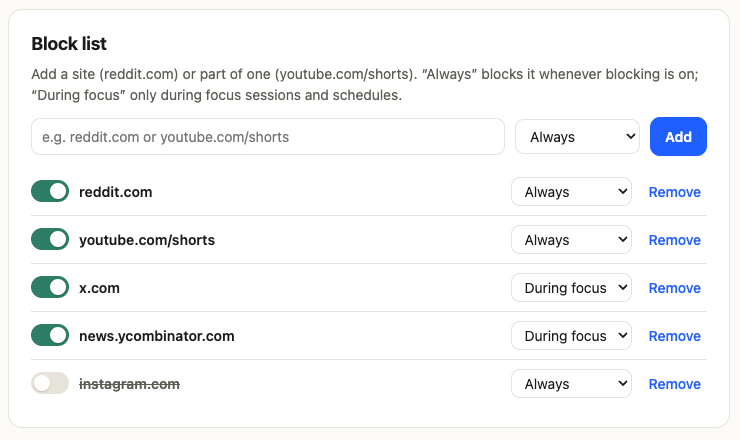
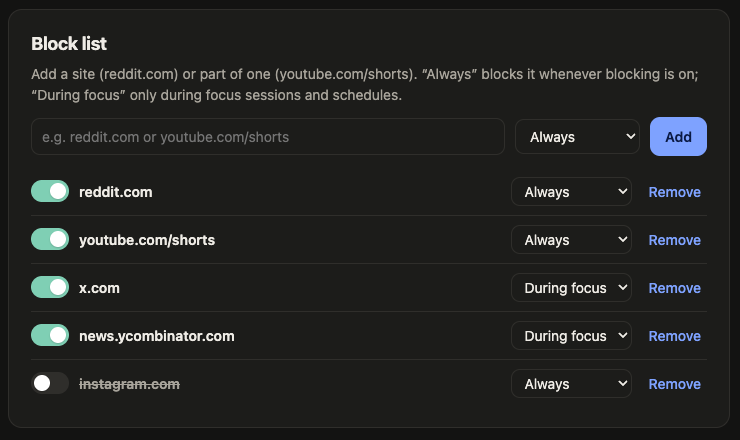
It's a smaller tool on purpose. The free plan is a full website blocker: as many sites as you like, whole sites or just a path, each set to “Always” or “During focus”, plus focus sessions with optional Pomodoro breaks. Pro adds schedules, strict mode (no removing sites or ending a session early), filters that hide YouTube Shorts and the home feed, the Reddit feed including r/popular and r/all, and in beta Instagram Reels and the X “For you” feed, an allowlist mode and local stats.
Switching from BlockSite
- Open BlockSite's block list and note the sites on it.
- Install Steady Focus for Chrome or Edge. Its settings open after install.
- Add each site. You can type
reddit.comor paste a full address; Steady Focus trims it to the site. Choose “Always” or “During focus”. - Remove BlockSite from
chrome://extensionsoredge://extensions, so two blockers don't fight over the same tab.
Other alternatives worth a look
- LeechBlock NG is free and open source (MPL-2.0), for Firefox, Chrome and Edge. It has up to 30 block sets with their own times, time limits and a lockdown mode. If you want no paid tier at all and code you can read, start here.
- Cold Turkey Blocker is a desktop app for Windows and macOS. It can lock a block so that, in its own words, you “can't just uninstall it”, and it can block apps too. It's much harder to bypass than any browser extension, Steady Focus included. Pro is a one-time payment.
- StayFocusd is free and limits time per site. We compare it in StayFocusd alternative.
FAQ
Does Steady Focus work in Microsoft Edge?
Yes. It's in the Edge Add-ons store and works the same as in Chrome. A Firefox version is coming.
Can I block only youtube.com/shorts and keep the rest of YouTube?
Yes, on the free plan. Add youtube.com/shorts to the block list and only Shorts pages are blocked, including when you open a Short from inside YouTube. To hide the Shorts shelves as well, use the Pro filter. Step by step: how to block YouTube Shorts.
Is there a phone app?
No. Steady Focus runs in desktop Chrome and Edge only. If you need phone blocking, BlockSite and others have mobile apps.
Can strict mode stop me from uninstalling it?
No. Browsers always let you remove an extension. Strict mode stops you from removing sites or ending a session until it's over. If you need a block you truly can't undo, look at Cold Turkey Blocker.
Sources
- BlockSite, Chrome Web Store listing (developer, features, privacy disclosure; version 7.1.1, updated July 26, 2026): chromewebstore.google.com/detail/eiimnmioipafcokbfikbljfdeojpcgbh
- BlockSite pricing page: blocksite.co/pricing
- BlockSite active plans (JSON from its checkout): premium.blocksite.co/plans?status=ACTIVE
- Free list limit:
limit_list_lengthfeature flag with a built-in default of 3, in the code of BlockSite 7.1.1 as downloaded from the Chrome Web Store on October 5, 2026 - Steady Focus, Chrome Web Store listing: chromewebstore.google.com/detail/achdjliidegkfliboaohmbndmbkbhicf
- LeechBlock NG: proginosko.com/leechblock, license on GitHub
- Cold Turkey Blocker: getcoldturkey.com, pricing
Prices and limits change. If something here is out of date, email support@steadytabs.com and we'll fix it. BlockSite is a trademark of its owner; SteadyTabs isn't affiliated with it.
More guides: Block YouTube ShortsStayFocusd alternative