A StayFocusd alternative, compared honestly
By SteadyTabs, the makers of Steady Focus · Checked October 5, 2026
StayFocusd has been a go-to Chrome blocker for years, and it's still free. What has changed is who runs it and what data it handles. Below is what StayFocusd's own listing, website and privacy policy say, what a security firm reported, where StayFocusd is better than Steady Focus, and where it isn't. We make Steady Focus, so we link every claim.
Who runs StayFocusd
On the Chrome Web Store, StayFocusd (now titled “StayFocusd – Website Blocker & Focus Timer & Shorts Blocker”) is published by Sensor Tower, San Francisco, and has about 700,000 users. Its website footer reads “ST Pulse, a Sensor Tower company”, and the Edge version is published as ST Pulse. Sensor Tower describes itself as a platform “to measure the digital economy”, selling app download, app analysis and ad performance data at sensortower.com.
What StayFocusd discloses about data
In the Privacy section of its Chrome Web Store listing, StayFocusd says it handles Web history, User activity and Website content. Its description also lists “Gen AI Analytics: Track and analyze your usage of AI chat platforms”, and says that StayFocusd “does not collect personal data from the web pages you visit”.
The linked privacy policy (effective September 23, 2026) covers StayFocusd together with other Sensor Tower apps. It says the app asks for your explicit consent before sending “Collected Data” to Sensor Tower's servers, that this data can include “stats on which websites you visit”, and that Sensor Tower may use it, in anonymized form, “to power and sell … other products and services such as the Sensor Tower products”. The same policy says Sensor Tower will never sell your personal information.
The “prompt poaching” report
On December 29, 2025, the extension-security firm Secure Annex published “Prompt poaching runs rampant in extensions”, about extensions that capture conversations with AI chatbots. It wrote that past versions of StayFocusd contained “behaviorally similar code”, and that the extension had “recently been updated” to collect “metadata about conversations but not the conversations themselves”. The Hacker News covered the report on January 6, 2026. We haven't analyzed StayFocusd's code ourselves; read the report and decide for yourself.
Where StayFocusd is better
- It's free. Its website says “Always for free”. Steady Focus's block list and focus sessions are free, but schedules, strict mode and the YouTube filters are in Pro ($2.99/month or $19.99/year).
- Daily time limits. StayFocusd can give a site a daily allowance and block it when time runs out. Steady Focus doesn't do time limits; a site is blocked either always or during focus.
- The Nuclear Option. It blocks sites for the hours you pick and, per its listing, “cannot be canceled” once on. It's free. Steady Focus's equivalent, strict mode, is a Pro feature.
- Usage history and phone pairing. It shows how long you spend on each site, and can pair with Sensor Tower's StayFree app on Android.
What Steady Focus does instead
Steady Focus is a website blocker that keeps everything in your browser. Its Chrome Web Store listing discloses that it doesn't collect or use your data. There's no account and no analytics, and the only network request is a license check if you buy Pro (privacy policy). It asks for access to five sites only (YouTube, Instagram, X, Twitter and Reddit), for the optional filters, not “all websites”.
| StayFocusd | Steady Focus | Plan |
|---|---|---|
| Block list (sites, paths, pages) | Unlimited block list, whole sites or paths like youtube.com/shorts | Free |
| Nuclear Option | Focus sessions, plus strict mode: no removing sites or ending early until the session ends | Free; strict mode Pro |
| Active days and hours | Schedules, including overnight ones | Pro |
| In-app blocking (Shorts, comments) | Distraction filters: YouTube Shorts and home, Reddit feed incl. r/popular and r/all; Instagram Reels and X “For you” in beta | Pro |
| Require Challenge | Settings password | Pro |
| Daily time limits | Not available | – |
| Usage dashboard | Weekly focus minutes and blocked visits, stored only in your browser | Pro |
| Chrome, Edge | Chrome, Edge (Firefox coming) | – |
StayFocusd features are from its Chrome Web Store description and website.
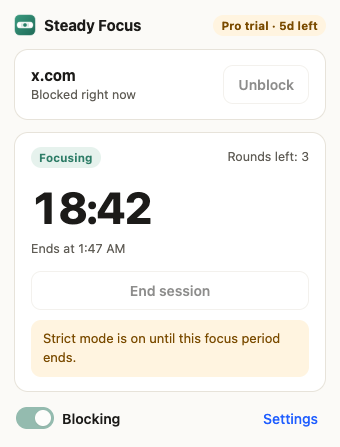
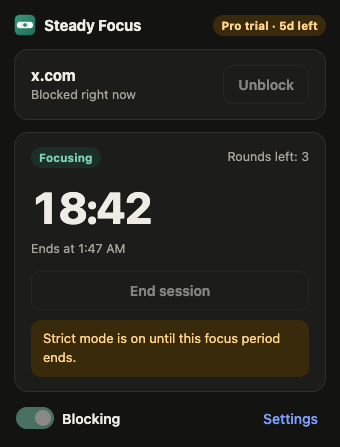
Switching from StayFocusd
- Open StayFocusd's settings and note your blocked sites.
- Install Steady Focus for Chrome or Edge. Its settings open after install.
- Add each site or path and set it to “Always” or “During focus”.
- Remove StayFocusd from
chrome://extensionsoredge://extensions.
Other alternatives
- LeechBlock NG is free and open source (MPL-2.0), with time limits like StayFocusd's, up to 30 block sets and a lockdown mode. If you want StayFocusd's features with no company in the middle, it's the closest match.
- Cold Turkey Blocker is a Windows and macOS app that can lock a block so you can't uninstall your way out. It's much harder to bypass than any browser extension, Steady Focus included.
- BlockSite has phone apps and sync. See BlockSite alternative.
FAQ
Is StayFocusd still free?
Yes. Its website says “Always for free”, as of October 5, 2026.
Does StayFocusd work in Edge?
Yes, it's in the Edge Add-ons store, published as ST Pulse. Steady Focus is also in both stores.
Can Steady Focus hide YouTube Shorts like StayFocusd's in-app blocking?
Blocking the youtube.com/shorts path is free. Hiding the Shorts shelves needs Pro. All the options, including free ones from other tools: how to block YouTube Shorts.
Can strict mode stop me from uninstalling?
No. Browsers always let you remove an extension. Strict mode stops you from loosening your settings until the session or schedule ends.
Sources
- StayFocusd, Chrome Web Store listing (publisher, users, description, privacy disclosure; version 4.6.15, updated October 3, 2026): chromewebstore.google.com/detail/laankejkbhbdhmipfmgcngdelahlfoji
- StayFocusd website: stayfocusd.com
- StayFocusd privacy policy (effective September 23, 2026): sensortower.com/page-stayfocusd-privacy
- Secure Annex, “Prompt poaching runs rampant in extensions”, December 29, 2025: secureannex.com/blog/prompt-poaching
- The Hacker News, “Two Chrome Extensions Caught Stealing ChatGPT and DeepSeek Chats from 900,000 Users”, January 6, 2026: thehackernews.com
- Steady Focus, Chrome Web Store listing: chromewebstore.google.com/detail/achdjliidegkfliboaohmbndmbkbhicf
- LeechBlock NG: proginosko.com/leechblock; Cold Turkey Blocker: getcoldturkey.com
If something here is out of date, email support@steadytabs.com and we'll fix it. StayFocusd is a trademark of its owner; SteadyTabs isn't affiliated with it or with Sensor Tower.
More guides: BlockSite alternativeBlock YouTube Shorts